Verify your pages are in the consideration set for AI Search citations
Check whether newly published pages are visible in AI search environments, so you can find discovery gaps before they affect performance.
Why AI indexing matters
Publishing a page does not mean ChatGPT or Perplexity can find it.
A page can be live, included in your sitemap, and indexed by Google, but still not be found by AI Search systems that retrieve sources for generated answers. Google Search Console can help you understand Google based discovery signals. But, OpenAI and Perplexity do not provide their own search consoles.
That creates a blind spot for SEO and content teams. You may publish a product page, comparison page, guide, or landing page and assume it can influence AI generated answers. But if ChatGPT or Perplexity cannot retrieve the URL, the page is unlikely to be cited or used as a source.
AI indexing checks help answer the first question in AI citation optimization:
Can the page be found at all?
A positive result means the URL appeared in a ChatGPT or Perplexity response during the check. That proves the page is retrievable by the AI Search system and part of the consideration set for citations.
GEO Playbook: How to verify your pages are in the AI citation consideration set
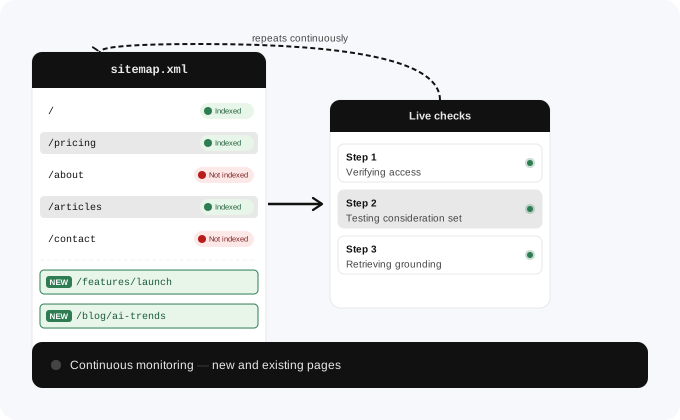
This playbook monitors newly discovered URLs from your sitemap and checks whether those pages are visible in supported AI search environments.
To apply this playbook, start with the pages that should matter for AI visibility. These are usually pages that explain your product, use cases, buying criteria, or high intent educational topics.
Then check whether those URLs are found by ChatGPT and Perplexity. The result is simple: found or not found.
Select the URLs that should influence AI generated answers. Start with pages that explain what your company does, what problems you solve, and how buyers compare options in your category.
Good examples include product pages, feature pages, comparison pages, integration pages, category pages, buying guides, landing pages, customer education pages, and high intent blog articles.
For larger websites, you can also focus on samples of webpages with a similar structure. For example, you may not need to check every product page, if they all follow the same technical and content structure.
For each URL, check whether the page is found in ChatGPT and Perplexity responses.
Manually, you can do this by asking questions about the page, its topic, and the specific information it contains. Do not only paste the URL and ask whether the system knows it. Instead, ask natural questions that someone might ask when looking for that information. For example, ask about the problem the page solves, the product or feature it describes, the comparison it supports, or the guide it provides. Then review whether ChatGPT or Perplexity returns your URL as a cited or referenced source.
With ALLMO, this check runs automatically. The GEO agent tests your URLs against ChatGPT and Perplexity and records a simple result for each system: found or not found.
A found result means the URL was returned in a response, which proves that the page is retrievable by that AI Search system and can be part of the citation consideration set. A not found result means the page was not returned during the check and may need technical review, Warm-up, or both.
Look at the pages that are not found. These URLs need follow up before you expect them to influence AI generated answers.
Check whether each missing page is accessible, included in the correct sitemap, internally linked from relevant pages, allowed by robots settings, and using the right canonical URL.
Also review whether the page is isolated, duplicated, too thin, newly published, or too similar to existing content. AI Search visibility is partly technical, but weak or unclear content can also reduce the chance that a page is retrieved or selected.
Before using Warm-up, check whether there is a technical reason the page may not be retrievable.
Common issues include missing sitemap coverage, weak internal linking, blocked crawling, incorrect robots settings, confusing canonical tags, duplicate URL versions, noindex tags, thin content, or pages that do not clearly answer a useful query.
This step helps you avoid sending weak or blocked pages into a discovery workflow. Fix the basics first so AI Search systems have a better chance of accessing and understanding the URL.
For important pages that are technically accessible but still not found, use Warm-up to help AI Search systems discover and revisit the URL.
After Warm-up, recheck the page in ChatGPT and Perplexity. The goal is to see whether the URL moves from not found to found.
Use the result as part of your publishing QA process. Each important new page should pass a basic AI indexing check before you expect it to contribute to citations, mentions, or AI Search visibility.
How ALLMO runs this workflow
ALLMO’s GEO agent runs this workflow automatically for new pages.
The agent monitors your sitemap, checks for new pages every 3 hours, and verifies whether those URLs are found by ChatGPT and Perplexity. Each check returns a simple result: found or not found.
For found URLs, you know the page can be retrieved by the AI Search system and can enter the citation consideration set.
For not found URLs, ALLMO helps you identify which pages need follow up. The next steps are to check for technical discovery problems and, where appropriate, use Warm-up to help ChatGPT and Perplexity discover or revisit the URL.
Key Benefits
- Find visibility gaps early See when important new pages are not yet visible in supported AI search environments.
- Find citation blockers early Identify pages that are live but not yet part of the AI citation consideration set.
- Prioritize technical fixes Use indexing results to identify pages that may need better crawlability, internal links, sitemap coverage, or content improvements.
Who it's for
Use this playbook to make AI indexing part of your publishing QA process.
Publishing a page is only the first step. This playbook helps you check whether new content is visible after launch.
Use indexing checks to find pages that need follow up before they can influence AI generated answers.
Frequently asked questions
What does AI indexing mean here?
AI indexing means that a URL was found in a ChatGPT or Perplexity response during the check. This proves that the page is retrievable by the AI Search system, can be cited and is generally part of the consideration set, that AI models consider when looking for grounding sources to provide an answer.
Is AI indexing the same as Google indexing?
No. A page can be indexed by Google and still not be visible in every AI search environment. AI systems use different discovery, retrieval, and grounding processes.
Which pages should I check first?
Start with pages that matter commercially or strategically. Good examples include product pages, feature pages, comparison pages, category pages, buying guides, integration pages, and high intent educational content.
Does an indexed result guarantee that the page will be cited?
No. A found result proves that the page can enter the consideration set. It does not guarantee selection in every answer. AI Search systems may still choose other pages because of relevance, quality, authority, freshness, or technical issues.
Which pages should I check first?
Start with pages that matter commercially or strategically. Good examples include product pages, feature pages, comparison pages, category pages, buying guides, integration pages, and high intent educational content.
What should I do if a page is not visible?
Start with the basics: sitemap inclusion, internal links, crawlability, canonical tags, robots.txt settings, javascript settings. As a next steps review the page quality. Then check again after making changes.
How often should I run this?
For active websites, review new page indexing once a week. For websites that publish frequently, use an automated monitoring setup so new pages are checked soon after launch.
More playbooks
Keep building your AI visibility strategy with these next steps.
Analyze the pages AI systems already cite, understand what page formats they prefer, and use those patterns to create new content to improve your visibility in AI generated answers.
Analyze metadata from frequently cited pages to understand how sites that shape AI answers are structured.
Find directories, review sites, and comparison pages, that are referenced in AI generated answers. Check where your brand is missing, where your profile is incomplete, and which sources are worth improving first.