

.png)
Table of content
Summarize with AI


Key Takeaways
- Prompt mapping, or prompt research, turns your products, buyer needs, and decision criteria into a set of AI prompts to track.
- The goal is a balanced prompt dataset focused on business success: cover the buying situations that matter most, identify where to improve, and keep tracking costs manageable.
- The 3-Basket Framework meets this goal by combining three methods for creating tracking prompts. Together, they provide an accurate and actionable view of AI visibility across products, topics, buying criteria, and realistic buying situations.
- Short-tail keywords, such as “Best CRM,” establish a category baseline. They show which brands AI recommends broadly and which sources shape those recommendations.
- Short-tail prompts with one buying criterion, such as “Best CRM for small businesses,” reveal how an individual requirement changes recommendations and your visibility.
- Long-tail conversational prompts combine buyer context with two to four decision criteria. They show which brands AI recommends when requirements occur together and help identify which strengths and gaps to prioritize.
In SEO, keyword research helps you decide which searches are worth competing for. In AI search, buyers can express the same need in dozens of ways. A good prompt set helps you win customers by showing what already works in AI search and where you have gaps to fix.
The framework focuses on consideration and decision prompts, when buyers are looking for options or choosing between them. Awareness prompts serve a separate goal.
Why measuring AI prompts is harder than SEO keywords, but we can still learn from it
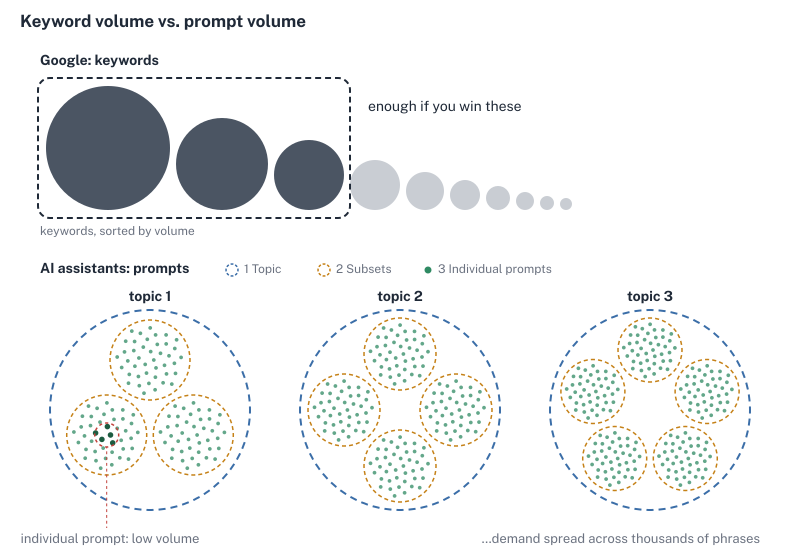
In SEO, you can estimate the direct business value of ranking for a keyword by working through three inputs.
Keyword value = Search volume × Conversion rate × Value per conversion
- Search volume estimates how often people search for a keyword. Keyword Planner and SEO tools help you show the demand and Google Search Console shows you the impression count for queries where your page appears.
- Conversion rate is the share of searches that ultimately convert. It is based on the click-through rate for your page in a Google Search and the share of visits that convert to perform the desired action (e.g. purchase a product, or book a demo).
- Value per conversion is what the outcome is worth, such as the expected value of a qualified CRM demo or the customer lifetime value.
The same business logic applies in AI search, but its inputs are harder to estimate.
Prompt value = Prompt volume × Conversion rate × Value per conversion
- Prompt Volume is impossible to estimate. AI assistants do not reveal that data to marketers, like Google did. And due to the long-tail nature of prompts, any exact prompt may be rare even when the underlying buying need is common.
- Conversion rate is harder to attribute, because AI assistants do not offer the sophisticated measuring system that exists for Google search. Clicking on a link is not the primary desired action in AI search. Consumers read a recommendation in a chat and go to that website directly, so they won’t count as AI referral traffic.
- Value per conversion. A converting customer still has the same value as before. The hard part is attributing it to the AI answer.
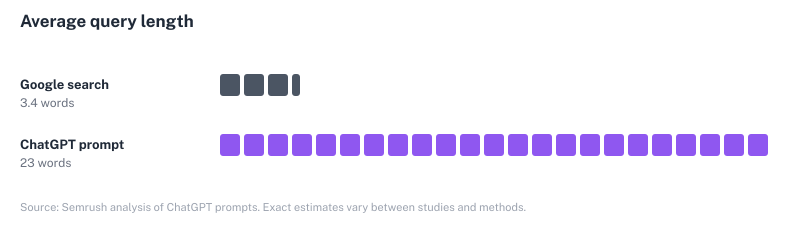
This leaves you with a measurement problem.
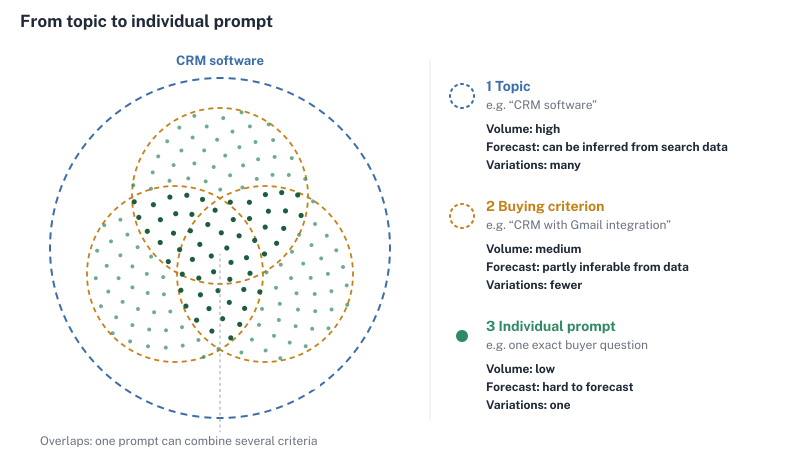
You rarely have enough information to value an individual AI prompt the way you would a keyword. The value is in what the prompt set lets you learn across a topic.
To close that gap, a new category of prompt monitoring GEO tools like ALLMO.ai, peec.ai, and Otterly emerged.
The core principle is simple. You define a dataset of prompts that you want to track, and based on these get data on how often you get mentioned and cited for relevant prompts.
This makes it critical to define prompts, as the prompt selection defines the snapshots of reality that you are seeing and that you base all your learnings on.
The process to define the dataset of prompts you want to track is often called “Prompt Mapping” or “Prompt Research”.
What prompts belong in your prompt dataset?
Start by mapping the parts of your business you want the prompt set to cover. Which categories do you want to win? Which products and services are priorities right now? Who buys them, and what are those buyers trying to get done? At ALLMO, I use those answers to build a company profile that guides prompt research.
You can map the context around these dimensions:
| Dimension | What to capture |
|---|---|
| Products & Services | What you sell and the product or service categories buyers look for. |
| Features & Capabilities | What the offering does, and what customers judge it on: capabilities, features, and buying criteria such as price, ease of use, support, or integrations. |
| Situations & Problems | The problems, needs, moments and occasions that make someone ask an AI for a solution like yours. |
| Industries | (B2B only) The industries your buyers operate in |
| Personas | Who is asking and what matters to them in their role |
| Location | (optional) Where the buyer is based |
You’ll quickly end up with a long list of possible criteria. At ALLMO, I typically aim for 3 to 10 distinct criteria per dimension, with as little overlap as possible to get the best tracking results. When deciding which criteria to include, also consider your own business priorities. The keyword and prompt value formulas discussed above can be a helpful heuristic to help you decide what matters most:
- Demand. SEO search volume and your own sales data can help you gauge interest in a topic like small-business CRM, even when you can’t reliably measure how often buyers ask a specific AI prompt.
- Likelihood of conversion. Give more coverage to situations where buyers are considering a purchase you can serve. A lower-volume topic can be a higher priority, if it brings you closer to the customers you want to win.
- Customer value. Consider what winning those customers is worth over time.
Further, consider your current business priorities, too. If declining Google traffic is making it harder to reach buyers in a category you depend on, give that category more attention in your prompt set.
There are countless other options to get inspiration for categories and topics to track, some of which I covered in the article on How to select the right prompts to track.
Why you can’t track every combination
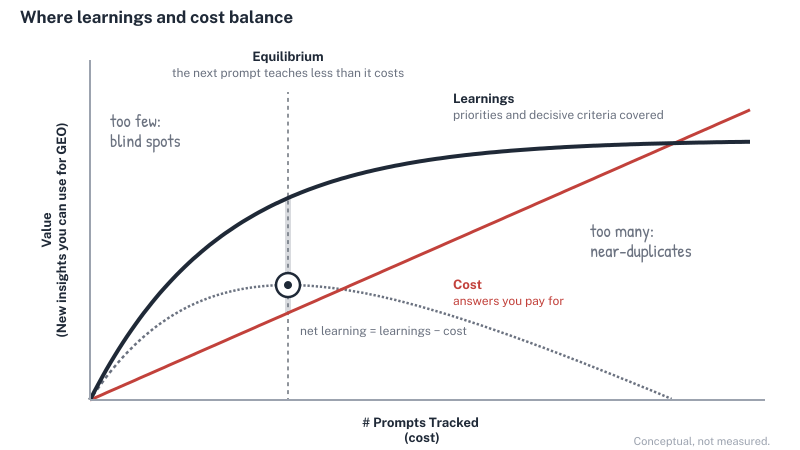
The next step is to turn the categories into prompts that cover your company. On paper, you have two main options that are often applied:
- Add a keyword-style prompt for each search criterion, such as “Best CRM” or “Best CRM for small business.” Some people even just track their top SEO keywords in AI search. However, as explained earlier, this leaves out the criteria and context buyers use to evaluate a product, making it alone not suitable to monitor AI search performance.
- Specific prompts reflect those decisions and the general nature of AI search better, but each covers a narrower buying situation.
Say you want to track a CRM across three product keywords (“small business CRM,” “sales CRM,” and “enterprise CRM”), six features, six different situations, five industries, and five buyer personas. If you wrote one prompt for every combination, picking one option from each group, the count would add up fast.
3 product keywords × 6 features × 6 situations × 5 industries × 5 buyer personas = 2,700 prompts
Across three AI models, tracking all 2,700 prompts for four weeks would generate 32,400 answers with weekly tracking or 226,800 with daily tracking. And most companies have more buying criteria than the ones mentioned above. This goes far beyond what most tools support, and would easily add up to several thousand euros per month.
Therefore, when creating your prompt dataset, you must consider this trade-off:
Business Value vs. Cost
You want to get an accurate picture of your company’s performance in AI search, so that you can understand where to optimize while keeping costs at a reasonable level.
How the three baskets build a balanced prompt set
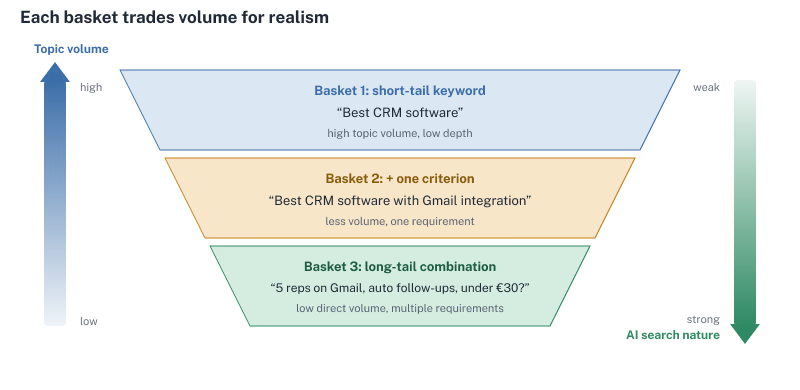
The three-basket framework is designed to balance exactly this trade-off. It combines three approaches to prompt monitoring, so that every tracked answer contributes as much as possible to your GEO return on investment.
Each basket has one job and answers a different question about your AI visibility. Together, they give you the basis for a strategy to win in AI search.
| Basket | CRM prompt | Job |
|---|---|---|
| 1. Short-tail keywords | “Best CRM” | Establish a category baseline. |
| 2. Short-tail prompts with 1 modifier | “Best CRM with Gmail integration” | See which way recommendations shift when you add one criterion. |
| 3. Long-tail conversational prompts | “We’re a five-person sales team at a B2B Compliance Software company. Please recommend a CRM with a Gmail integration, and automated follow-up reminders for under €40 per user per month?” | See how recommendations change when realistic requirements occur together. |
Keep the product category fixed so you can compare what AI recommends as the buyer’s requirements get more specific.
Basket 1 · Short-tail keywords establish a category baseline
Best [product or service]
What it is
The first basket contains the products and services you mapped earlier, phrased the way buyers search for them. These are the core of what you sell, and this framework focuses on the consideration and decision stages, when someone is about to make a buying decision. That’s where being recommended matters most.
How to write the prompts
- Start with the names buyers use when they’re looking for what you sell. If you offer a CRM, that might be “CRM” or “sales software”.
- Add a word that clearly signals the search intent to the AI. Just prompting “CRM” might get you a definition. “Best CRM” asks the AI to compare options and recommend the strongest ones.
What you can learn from these:
- Category leaders: See which brands AI recommends when asked for the overall best options in a category.
- Benchmark: a top-level reference point for your visibility. Use it to analyze how adding a criterion to a product or service changes your position.
- Sources: which websites the AI cites for category-level answers, such as review sites, comparison articles or vendor pages. These are the sources that shape how the AI sees your category.
Limitations:
- Some users simply ask for the best CRM, but most add context, or the AI applies it automatically from previous conversations.
Basket 2 · Short-tail conversational prompts + buying criterion
Best [product or service] with [criterion]
What it is
The second basket adds one buying criterion modifier to a Basket 1 prompt. It’s a deliberately simplified buying situation that tests each criterion in isolation: only one requirement changes, so you can see the direction of the change.
How to write the prompts
- Take a Basket 1 prompt and add one criterion. “Best CRM” becomes “Best CRM with Gmail integration” or “Best CRM for small businesses”. Keep everything else the same, so the criterion is the only difference.
- A category can have 20 or more plausible criteria. Give Basket 2 slots to the handful most likely to change a buying decision.
What you can learn
- Direction of change: whether a criterion raises or lowers your visibility compared with the baseline. If your CRM drops out more often once Gmail is required, that tells you where to investigate.
- Critical criteria: which of your most important criteria the AI connects with your brand, and which it connects with competitors.
- Sources: which websites the AI cites for a specific criterion, such as integration directories or documentation pages.
Limitation
Buyers rarely ask about just one criterion, and a drop alone doesn’t tell you why it happened. The cause could be the product, how clearly you document the feature, the sources the AI finds, or which competitors enter the shortlist. Basket 3 shows how important criteria play out together.
Basket 3 · Long-tail conversational prompts
I’m a [persona] at a [company context], and I want a solution for [situation]. Which [product or service] for [feature/capability] can you recommend?
What it is
The third basket tests criteria in combination. Each prompt reconstructs a realistic buying situation: who is asking, in what context, and which requirements they bring together.
How to write the prompts
- Start from a persona, their company context and a situation.
- Combine two to four decision criteria a buyer might weigh together. For example, “We’re a five-person sales team at a B2B compliance software company. Which CRM would you recommend if we need Gmail integration and automated follow-up reminders for under €40 per user per month?”
- Repeat your most important criteria across several combinations. Each prompt covers several criteria within the same answer budget, so Basket 3 tests far more criteria than Basket 2 can.
- Adapt the wording to how your buyers actually ask.
What you can learn
Basket 3 learnings are strongest in aggregation. One prompt tells you little; patterns across many prompts show what the AI picks, and when.
- Visibility: how often your brand is recommended in situations that resemble real buying decisions more closely. Often category leaders are replaced by brands that are optimized more for long-tail, niche requests.
- Relative weight of criteria: which criteria matter more when they meet. If your CRM drops out when Gmail is required but returns once automation is added, that suggests automation is attributed more weight by LLMs in that situation. This helps you decide which buying criteria to optimize for first.
- Sources: which websites and brands show up across several prompts and criteria. Recurring sources show you what the AI relies on for which kind of buying situation.
Limitations
- Low, unpredictable volume: you can’t know how many people ask exactly this prompt. Treat each prompt as one sample of a buying situation, not as a keyword with its own demand.
- No single cause: several criteria change at once, so one result can’t be traced to one criterion. Read the results against Baskets 1 and 2, and check which competitors enter or leave the shortlist before drawing conclusions.
How to build a good three-basket distribution
Start from your commercial priorities
Rank the products and services that matter most for your business, then rank the criteria that could change a buyer’s choice for each one. You may use GSC volume to identify where demand may be strongest. Use sales calls, customer support inquiries, user interviews, on-site searches, online forums, and reviews to find the words buyers use and the criteria that matter to them.
When you sign up, ALLMO automatically creates a company profile that covers all key topics.
Allocate prompts by priority
Give higher-priority topics more coverage across each baskets. Use extra Basket 2 and 3 slots to test more of the criteria and combinations that could change what you do. Further you should use those to test assumptions.
For example, one priority offering could start with 1 category baseline, 3 single-criterion prompts, and 6 long-tail prompts. Across two to four offerings in one market and language, that gives you roughly 20–40 unbranded prompts to trial.
This will give you coverage across the key business criteria you have defined. This will help you to break down visibility by topic in your analysis. If you spot significant weaknesses, that may be a way to optimize.
During onboarding ALLMO automatically creates prompts and suggests an optimized dataset that fits your tracking budget.
Trial, review, and rebalance
Before you commit your budget, read a few answers for each prompt to check that it produces the kind of recommendation you want to track. Replace near-duplicates, and record which prompts changed so a new mix of questions doesn’t look like a natural change in visibility.
Three patterns suggest a prompt needs to be replaced.
- If an answer mentions no brands at all, the prompt is too general to count as a solution or purchase prompt.
- If an answer cites no sources, the AI is answering from memory alone, which makes the result harder and slower to influence.
- If the brands mentioned come from entirely different industries rather than from competitors, the prompt is probably too broad or misleading, and a prompt closer to your business will give you more value.
From results to decisions
When you use the 3-Basket Framework during prompt mapping, the results in the GEO tool of your choice give you both breadth and depth. For a quick overview, you can see your overall AI visibility score and how you rank against competitors. To understand what drives those results, break them down by topic and buying criterion, compare your performance with specific competitors, and see which brands AI recommends and which sources it cites in different buying situations.
You can analyze your results in the order of the baskets: start with the category baseline, use single criteria to identify strengths and gaps, then check which patterns hold in realistic buying situations. How you use that sequence depends on where you start.
If you’re a category leader, build down. Say you already appear for “best CRM software,” so your task is to identify topics where niche players replace you and how you’re positioned against the competitors that appear next to you. Use Baskets 2 and 3 to see which criteria or buying situations push you off the shortlist. Where you do appear, analyze the co-mentions: which brands you’re most often compared to in the same answer and which sources the answer uses. Optimize your content to differentiate you from those competitors, so that you appear as the most appealing option when compared against them. Protect the positions where you’re clearly differentiated, and fix the ones where you drop out or blend in.
If you’re a challenger, build up. You may not appear for the broad category, but unless you just started your business, you are typically already mentioned in a niche, such as “small sales teams that need Gmail and automated follow-ups”. Use that niche as your starting point. Test one adjacent criterion or audience at a time, and expand where your advantage holds. Each step brings you closer to the category itself. It helps you understand which strengths AI already associates with your brand, and where you need to optimize.
| Pattern in the prompt set | Decision | First action |
|---|---|---|
| Your CRM regularly appears for the category and holds its place when buyers add priority criteria. | Protect | Identify the pages and sources that support those recommendations and keep the underlying information current. |
| Your CRM appears for the category and drops out when buyers ask for Gmail integration. | Fix | Diagnose the gap first. Check product fit, what your pages say, which sources the answer cites, and which competitors enter the shortlist. |
| Your CRM consistently appears for small sales teams that need Gmail and automated follow-ups. | Expand | Test an adjacent use case or audience, changing one factor at a time to see where the advantage holds. |
Don’t stop at your overall share of visibility and citations. Also check how many distinct prompts you and each source appear in: a high share of responses can come from strength in a single topic, while a high share across distinct prompts shows which sources matter across your industry. Because the three baskets cover the whole category rather than a few keywords, they make that difference visible.
During diagnosis, track recommendations, brand mentions, and citations separately. A brand can be mentioned without making the shortlist, and a page can be cited without its brand being recommended.
Other prompt types to track separately
Some prompts are worth tracking alongside your three baskets, but they test different things, so analyze them separately. Leading GEO tools, like ALLMO, let you tag them as their own groups so they don’t blend into your unbranded visibility.
- Branded prompts. Questions about your brand can reveal factual errors, recurring concerns, and which of your pages are worth improving. Track the sources AI uses when it describes your offer. Report branded results separately from unbranded visibility.
- Comparison prompts. A head-to-head prompt like “HubSpot vs. Salesforce for a five-person sales team” tests how AI evaluates named options and which sources it uses to justify the differences. Use those sources and the answers to see where your positioning or documentation could be clearer.
- “Alternative to” prompts. These are similar to comparison prompts, but start from a single competitor: “What’s a good alternative to HubSpot for a small sales team?” They show whether AI suggests you to buyers who are ready to switch, which competitors’ customers you’re most likely to win, and which sources are used for such comparisons.
- Awareness prompts. Earlier in the journey, buyers describe a problem rather than a product: “How do I stop sales follow-ups from slipping through the cracks?” In SEO, ranking for these questions brought people to your site. In AI search, discovery happens inside the chat, brands are often not named, and the sources are hard to see. Start your prompt set with the consideration and decision stages, where being recommended directly influences a purchase, and add awareness prompts later as a separate set.
How the 3 basket framework for prompt monitoring was developed
The three baskets come out of practice. I developed them in direct work with clients across B2B software, manufacturing and travel, and refined them while setting up prompt sets for hundreds of companies. An earlier version, for example, shaped the prompt set in my travel industry case study, and more case studies that will soon be published.
The structure draws on two proven concepts from the fields of statistics and economics. Conjoint analysis, a statistical method widely used in market research, shapes how the prompts are designed: each buying situation is broken down into criteria and their values, single criteria are tested in isolation, and carefully chosen combinations reveal how they’re weighed against each other without testing every possibility.
For the CRM example above, a conjoint-style design needs around 42 carefully chosen prompts instead of all 2,700 combinations to estimate how each criterion affects your visibility, as long as the criteria mostly work independently of each other.
Further, two ideas from economics shape the prompt portfolio as a whole. Portfolio theory inspired its balance: approaches with different strengths and weaknesses offset each other, so the combination tells you more than any single basket. Consumer choice theory from microeconomics shows how to size it: like an optimal basket of goods under a budget, weighing the cost of each prompt against what it adds reveals the mix and number of prompts worth tracking.
Further, credit where credit is due, research from other GEO industry players influenced the details. Data on how people use ChatGPT helped me understand what a prompt set that covers relevant buying situations should look like. Radyant’s guide on Prompt tracking for AI Search: how to select the right prompts inspired the persona-based format of Basket 3, and Graphite’s Demystifying Randomness in AI research on answer variability shows that around ten runs give a usable estimate of how consistently a brand appears, so a prompt doesn’t need hundreds of repetitions, making this a reliable approach for optimization.
Try it in ALLMO
In ALLMO, the 3-basket framework runs inherently as part of your onboarding after you create an account. ALLMO builds your Company Profile based on your websites, with your products, buying criteria, personas and target industries. You can adjust it at any time. From there, it generates prompts and selects a balanced prompt portfolio across the three baskets. The coverage view then shows which topics and criteria your portfolio covers, and where gaps remain. Try ALLMO’s GEO tool with best-in-class prompt selection now →
Frequently Asked Questions
What is prompt monitoring?
Prompt monitoring means running the same prompts in AI tools on a schedule and analyzing the answers. It shows how often AI mentions or recommends your brand, which competitors appear, and which pages it cites. You can compare those results over time to see where your visibility changes.
How often should I track prompts?
Track most prompts weekly for a baseline. Run a smaller set daily when you need to spot changes sooner. AI answers vary between runs, so compare several responses under the same settings before treating a shift in visibility as a trend.
Should I track my SEO keywords for GEO?
Use your SEO keywords to identify topics worth tracking, then phrase them the way a buyer would ask for a recommendation. For example, turn “CRM software” into “Best CRM” and add “Best CRM with Gmail integration” to see how that requirement changes the shortlist.
Should I track spelling and wording variants of the same prompt?
Keep one version by default. Test variants separately when wording is the question, such as whether buyers using a technical term get different recommendations from buyers who describe the same need in everyday language.
Summarize with AI
More articles




Track your AI search visibility
See where your brand appears in ChatGPT, Perplexity, and other AI search engines.