Product updates

ALLMO AI Changelog

The latest features, improvements and fixes.

More detailed prompt, domain and company analytics

Explore AI visibility in more detail with our redesigned prompt, domain and company views.

More detailed Prompt Details
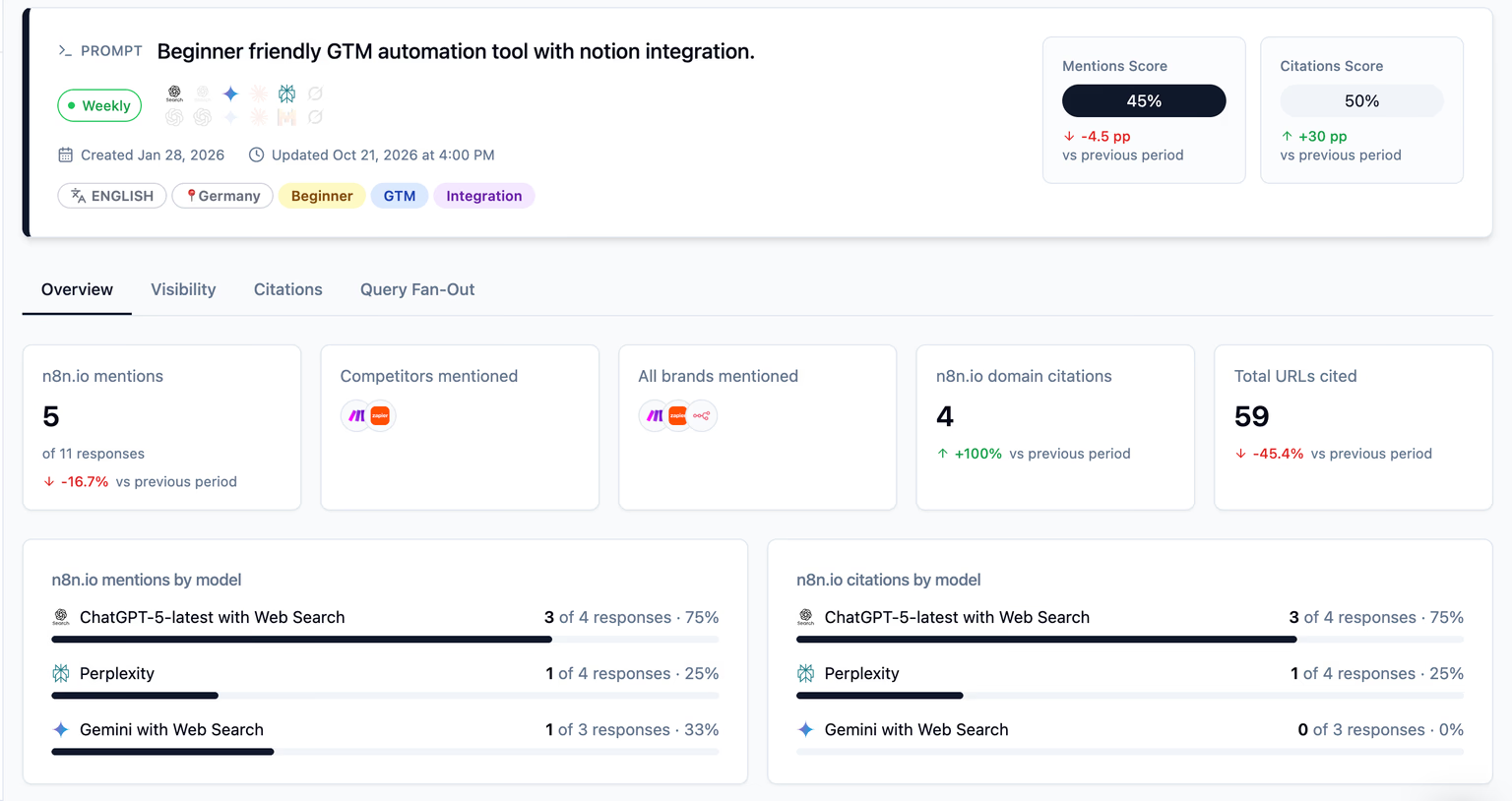
image.png

Open a prompt to explore its performance through four tabs, with date and model filters applied across the page.

  • Overview brings together response counts, brand mentions, citations, competitors and model breakdowns. Key metrics show changes against the previous period of the same length.
  • Visibility shows brand mention trends and a ranked table of the top brands appearing in that prompt’s answers.
  • Citations shows Citations Over Time, Website Share by Category, Top URLs and Top domains, helping you see which sources appear most often and how that changes for a specific prompt.
  • Query Fan-Out brings the searches behind that individual prompt into a dedicated view, with a word cloud, searchable query table and a drill-down into the responses associated with each query.

Redesigned Domain Details
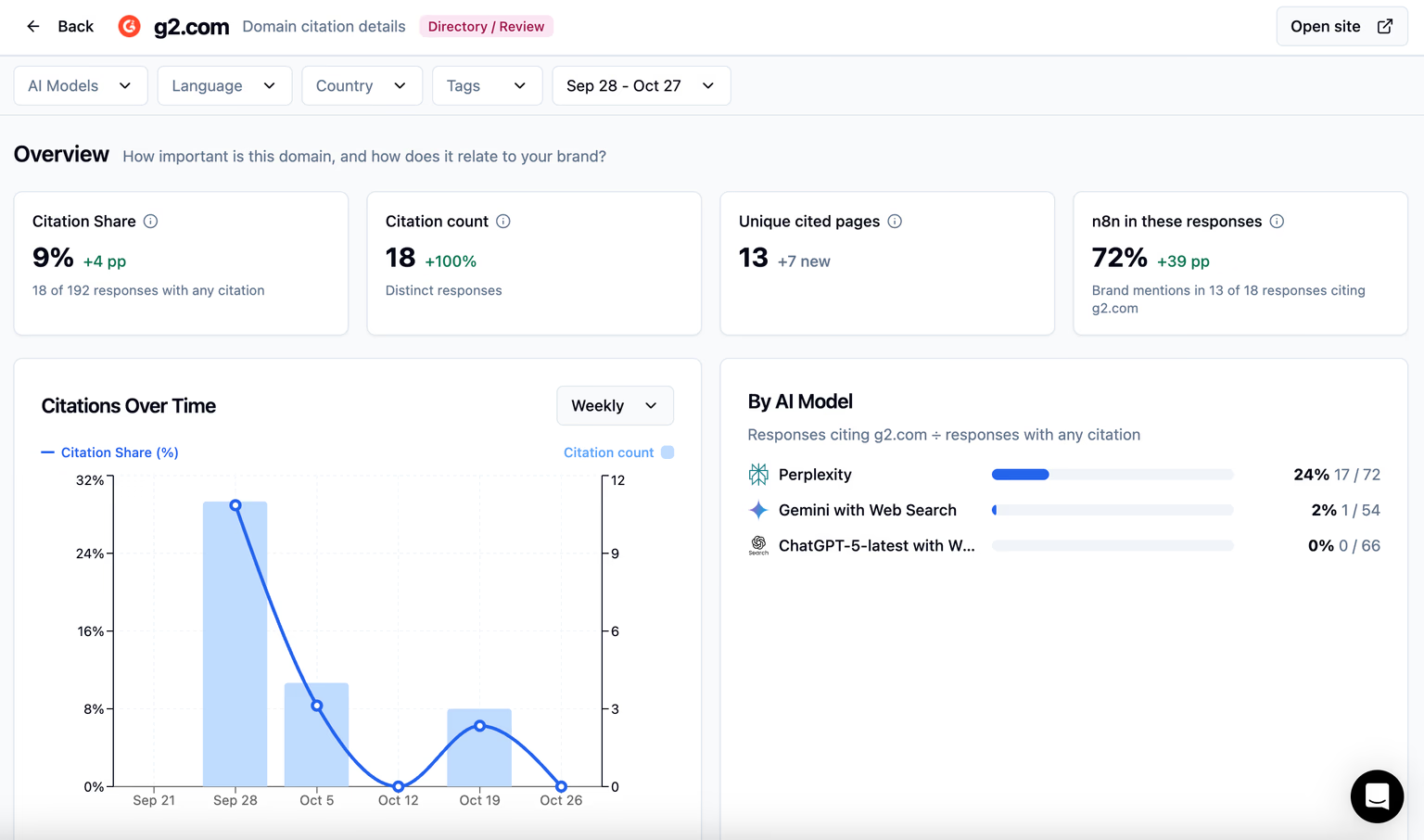
image.png

Open a domain from Domain Citations to see how often AI cites it for your prompt dataset, which pages of that website are referenced most often and which brands are mentioned in the same answers.

  • The overview shows Citation Share, Citation count, Cited pages and how often your brand appears in responses citing that domain.
  • Citations Over Time and a breakdown by model reveal changes in the domain’s presence. A brand comparison shows how often you and your competitors appear in answers that cite it.
  • Pages lists citation counts, prompt counts and 1st seen dates, with New, Rising, Steady or Declining labels, allowing you to spot trends in citation patterns for that URL. URL variants for the same page are grouped together, and page titles appear where available.
  • Prompts & responses shows which prompts cite the domain, their Citation Rate, the models involved, whether your brand was mentioned and the most cited page.

The brand comparison describes the AI answers that cite a domain; it does not indicate which brands the source page itself mentions.

Redesigned Company Details

image.png

Open a brand from Visibility for a detailed picture of its presence in AI responses, the prompts mentioning it and the sources cited alongside it.

  • Share of Voice, Brand mentions, Prompt Share and Rank show the brands position.
  • Trend charts, model breakdowns and a comparison of brands mentioned alongside it help you understand where its visibility comes from.
  • Prompts & responses provide you with a breakdown by prompts where the brand is mentioned, including detailed mention counts, rates, and models.
  • Sources shows domains cited in answers mentioning the company, with citation counts, Share of mentions and prompt counts. This way you can see which sources shape the responses, where a specific brand is mentioned often.
  • The Matching section shows you how the company is identified in AI responses. To improve the matching accuracy even further, add a custom alias for deterministic text-based matching, or suggest edits to the system aliases, custom report variations and competitor settings.
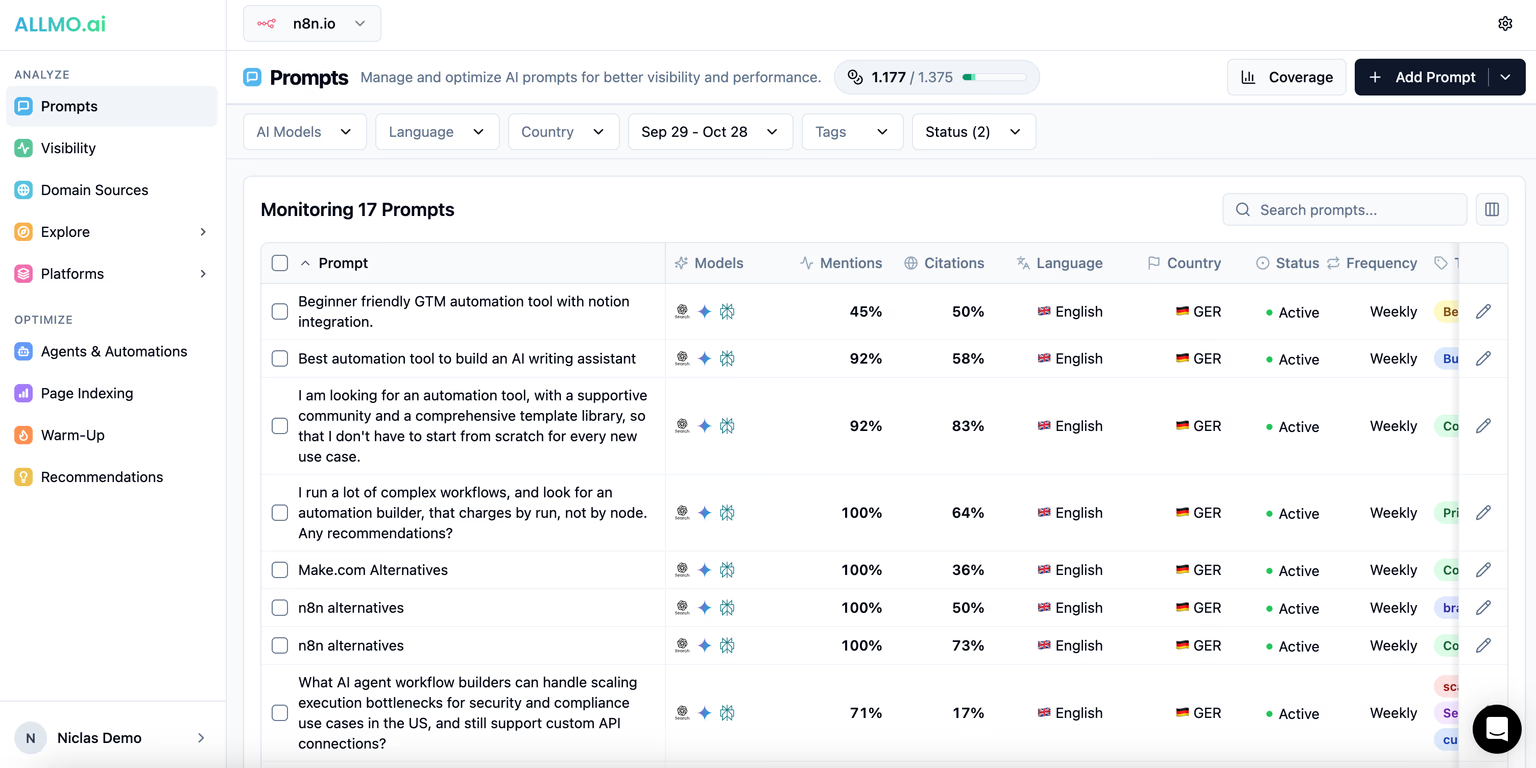
A redesigned Prompts table

ALLMO.ai Prompts dashboard showing 11 monitored AI search prompts, with metrics for brand mentions and citations, AI model coverage, language, country, monitoring status, and tracking frequency.

A redesigned Prompts table

The Prompts table makes it easier to compare performance and manage larger prompt watchlists.

  • Mentions and Citations show scores for the selected date range and models. Changing the date range updates the metrics without hiding prompts that had no responses in that period.
  • Use Show / hide columns to choose the information you need, including Total responses, Created and Last run. Column choices and Rows per page are saved for the report and shared across all members in your organization.
  • Sort by prompt, AI search metrics, language, country, status or tracking frequency. Full prompt text and tags wrap instead of being cut off, while the prompt and edit controls stay visible when scrolling horizontally.
  • Choose 20, 50, 100, 200, 500 or all rows per page. Select the current page, then extend the selection to all prompts matching your filters for bulk updates.
  • Add Prompt now brings Manual, CSV import and Suggestions together in one menu.

Small fixes

  • Prompt Coverage hides empty prompt-type rows that do not apply to your report, while retaining any types that already contain prompts.

New response detail view with inline citations and brand highlighting in AI responses

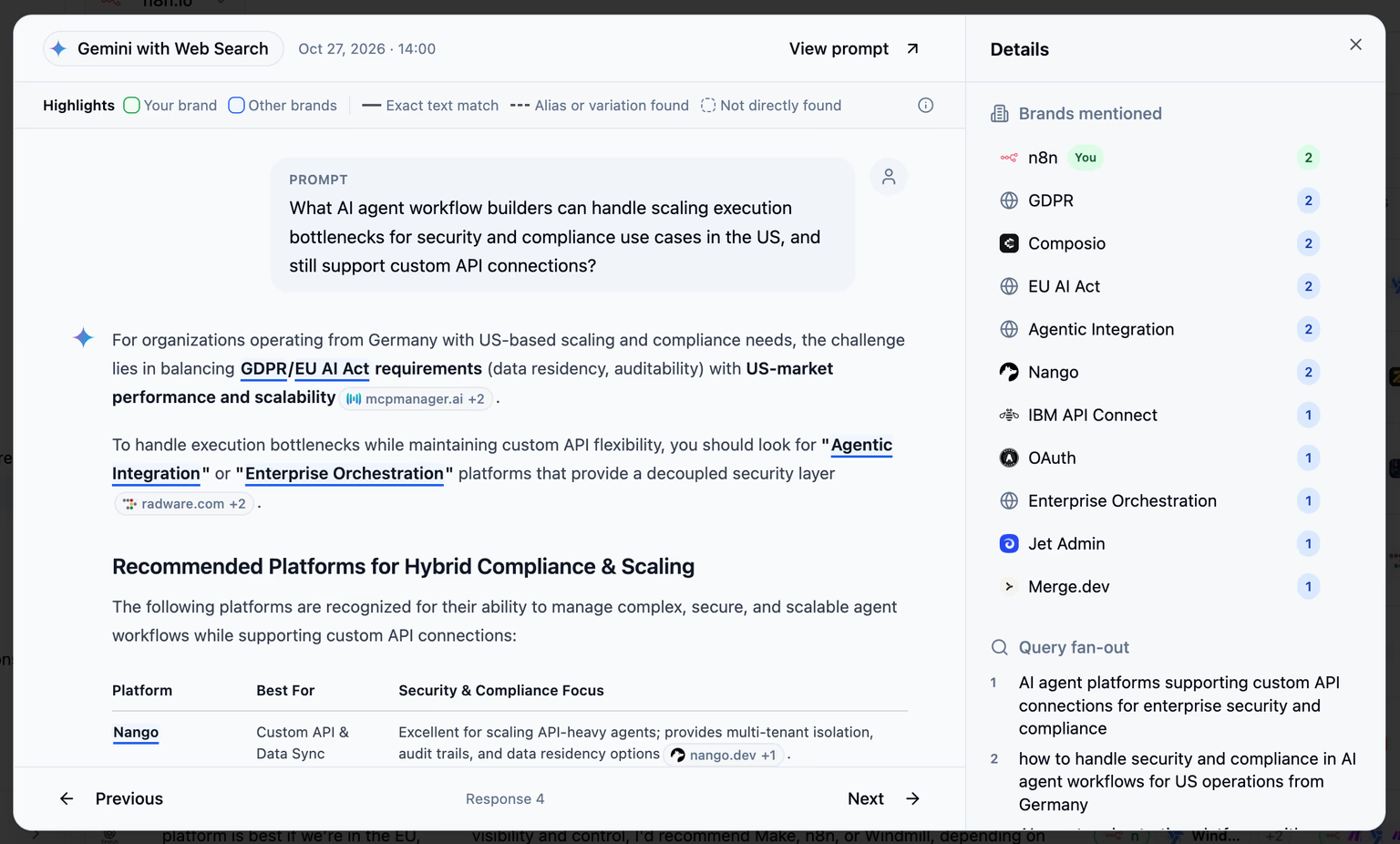
ALLMO.ai response detail view showing a Gemini web search answer, highlighted brand mentions, mention counts, and query fan-out searches for AI agent workflow platforms.

A new response detail view

Open an answer from Responses to read the prompt and full answer alongside its brands, searches and sources.

  • The Details panel brings together Brands mentioned, Query fan-out and the source lists.
  • Use Previous and Next to move between responses, including across table pages, without closing the detail view.
  • Select View prompt to open the linked prompt’s analytics.
  • Inline citations and brand highlighting also appear in the expanded Response Text within a prompt’s analytics.

For existing responses: Older answers are processed for citations and highlights when you open them, where the stored response data supports it. You do not need to rerun the prompt.

Inline citations: see the source behind the answer

AI Responses now show inline citations at the respective points in the text, so you can identify them quickly.

  • Citation chips show the source’s domain and favicon.
  • Hover over a citation to inspect its sources, then open the original page or explore Cited pages for that domain.
  • Hover over a citation or a source in the Details panel to highlight the matching item in the response view.
  • Cited in text separates pages referenced inline from Additional sources returned by the model. Citation counts show how often each page is referenced in the answer.

Inline citations depend on the source information supplied by the AI provider.

Brand highlighting in AI answers view: find your brand and competitors in context

Brand mentions are now highlighted directly in the answer, making it easier to see how AI describes your brand alongside competitors.

  • Your brand is highlighted in green and competitors in blue.
  • Hover over a highlight to see the brand and the wording that matched.
  • In the Brands mentioned section, you see how many text highlights each brand has.

Brands counted through a domain match or AI name resolution can still appear in the panel without a matching name in the answer. These are labelled Not directly found in text, with an explanation on hover.

Improved Prompt Recommendations

Improved Prompt Suggestions

New Long-Tail suggestions now ask AI assistants to recommend a product or service, rather than explain how to choose one. Making the answers more focused on measuring which brands AI recommends.

  • The updated wording applies to newly identified suggestions across languages.
  • Existing prompts keep their wording.

To try the updated suggestions, open Suggestions from your report’s Prompts page and select Generate more.

Small fixes

A new way to find and refine the right prompts to track

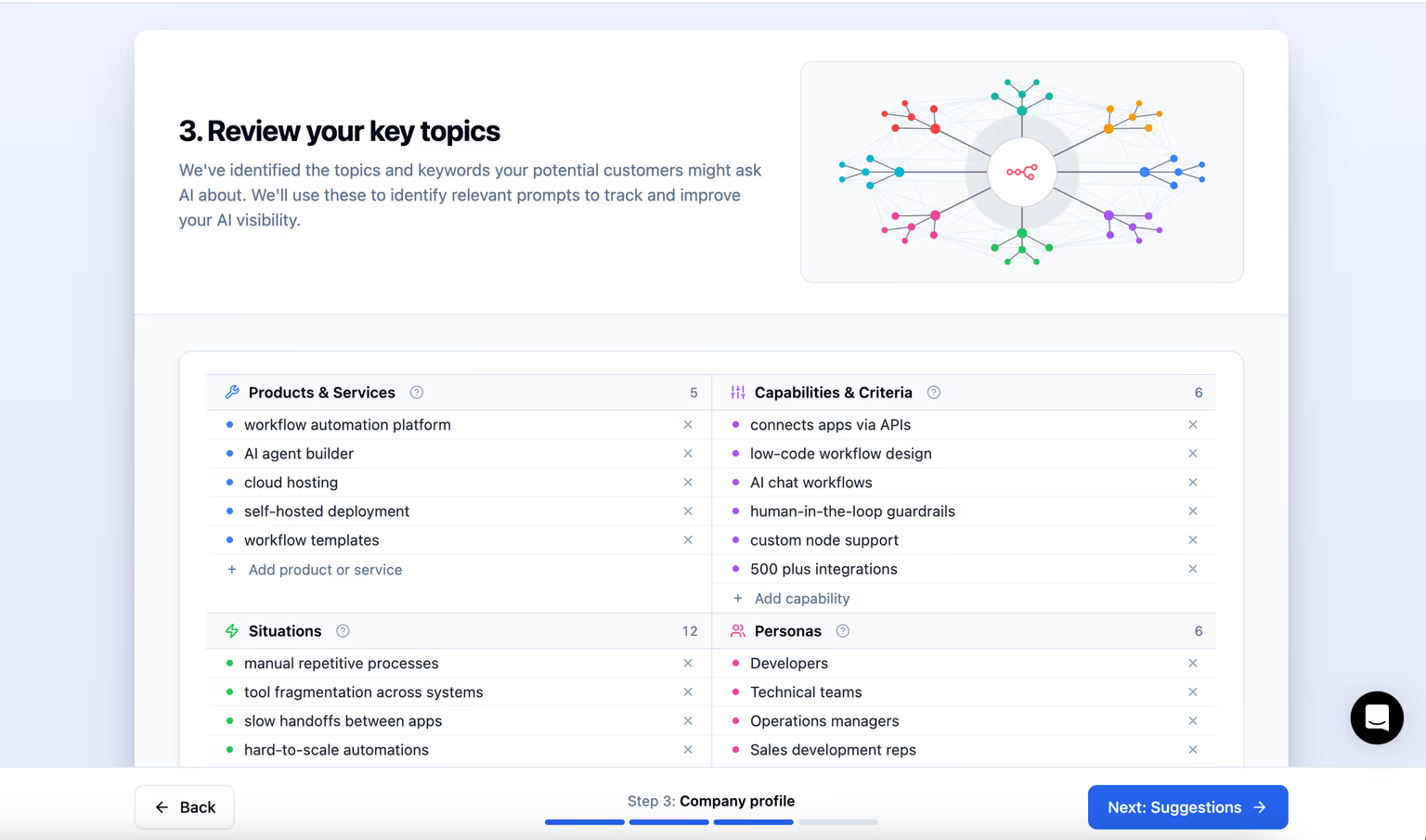
Screenshot of ALLMO.ai’s onboarding process, showing Step 3: “Review your key topics.” Users can review, remove, and add AI-identified topics across four categories: Products & Services, Capabilities & Criteria, Situations, and Personas. These topics help generate relevant prompts for AI visibility monitoring.

Finding the right questions to track now takes less manual work, with more ways to tailor suggestions to your business and audience.

Improved Prompt Suggestions

You can now choose a balanced set of suggestions and refine individual questions before adding them to monitoring.

Changes to Step 2 (Your business):

  • Awareness suggestions cover questions people ask before comparing solutions.
  • Language and country settings: the language selection workflow for prompt suggestions was simplified. You can now run the Prompt Suggestions flow only for one language. You can still track as many languages as you want in the final report.

Changes to Step 3 (Company Profile):

  • Company Profile simplification: Related profile categories are combined into Situations, Capabilities & Criteria, and Personas. Reducing down the number of overlapping data.
  • Under Who buys from you?, choose Businesses (B2B) or Consumers (D2C). If you serve both, choose your main audience and rerun identification for the other later.

For existing profiles: Your original data is retained. Verify if there are any overlaps in the prompt coverage tab.

Changes to Step 4 (Prompt Suggestions):

  • Pick prompts for me selects pending suggestions for your chosen language, taking prompt types, your company profile and your plan into account. It works independently of the type, tag and search filters on screen.
  • Edit a pending suggestion’s wording and tags, with changes saved automatically.
  • Get a warning if the proposed schedule exceeds the credits available in your plan.

The improved Suggestions workflow, will automatically be launched for all newly created reports. For existing reports, open Suggestions from your report’s Prompts page.

For existing profiles: Your original data is retained. Review the merged categories for duplicates; Prompt Coverage figures may change with the new grouping.

Prompt Location

  • New and edited prompts now require a specific country; existing Global prompts continue to run. Choose a country when you next edit one.
  • Existing multilingual prompts keep their settings.

This way, it’s more explicit where the tracking happens, given that most provider default to the US for prompts with unspecified location. By default, I recommend to track the location of your main audience.

Small fixes

  • Prompt Coverage adds status and tag filters, plus a Back button to return to suggestions.
  • Short-Tail and Long-Tail labels make prompt types easier to distinguish.
  • Reject all shown only rejects suggestions matching your current filters.
  • Improved duplicate detection and confirmation messages clarify which prompts were added to monitoring.

Improved visibility credit management transparency

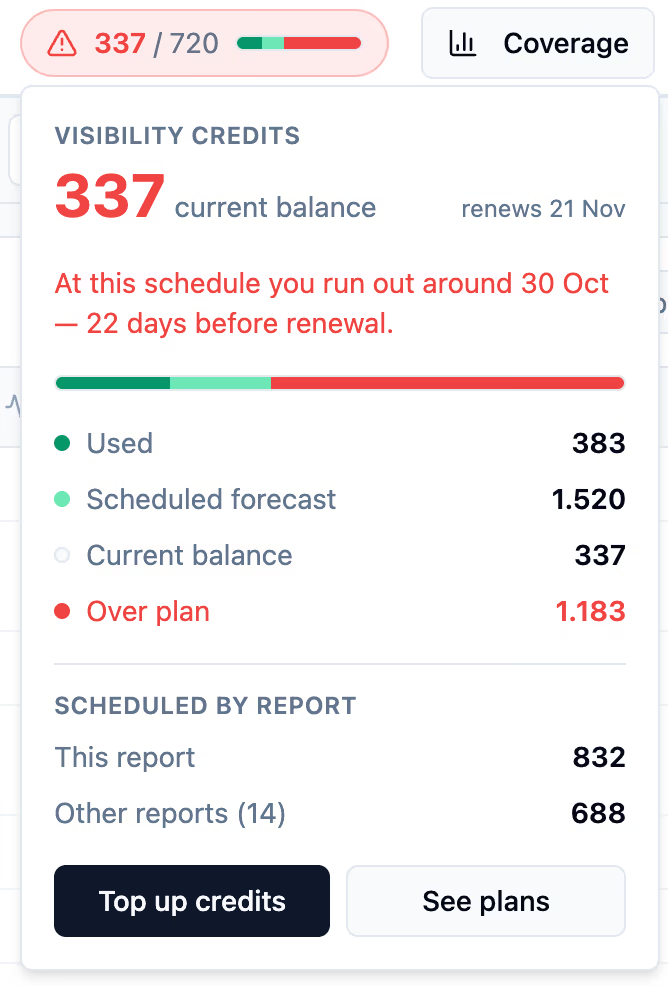
ALLMO.ai visibility credits forecast popover showing a 337 current balance, a 1,520 scheduled forecast, and a warning that credits run out around 30 Oct — 22 days before the 21 Nov renewal.

This update makes it easier to plan your visibility credits and understand the cost of your prompt schedules.

New visibility credit forecasts

You can now see whether your scheduled prompt runs are going to use up your visibility credits before your next renewal, so you can adjust your tracking in advance.

  • Breakdowns show how each report and tracking frequency contributes to expected usage.
  • Find the forecast on your dashboard, Prompts, or Settings → Billing & Usage.

More accurate prompt cost previews

When you add or edit a prompt, the cost preview shows the credits needed before renewal and warns if the schedule exceeds your available balance.

Learn how ALLMO credits work.

Small fixes

  • Organization members can save shared view defaults in Report Settings.
  • The report overview table on the start page now only counts active prompts, as part of the prompt count.
  • Credit balances, warnings and usage figures have been unified across reports and setting screens.

Welcome to the ALLMO.ai changelog

Welcome to the ALLMO.ai changelog! From Q4 2026 onward, this is where we document new features, improvements and fixes.

For information on all live features, including those launched earlier in 2025 & 2026, visit our Help Center.